



Introduction: Mastering Your Google Ads Campaigns
Alright, let’s talk Google Ads. Powerful stuff, isn’t it? It can drive targeted traffic, boost your brand visibility, and ultimately, grow your business. But, and this is a big but, managing Google Ads campaigns effectively can feel like navigating a complex maze. You’re juggling keywords, bids, ad copy, landing pages, and performance metrics – all while trying to stay within budget. That’s where Google Ads management software comes in. These tools are designed to simplify, automate, and optimize your campaigns, saving you time, money, and a whole lot of stress.
In simpler terms, imagine trying to build a Lego castle with just your hands and no instructions. Possible, but pretty inefficient, right? Google Ads management software is like getting a detailed instruction manual, pre-sorted bricks, and maybe even a little robot assistant to help you put it all together faster and better.
Why Use Google Ads Management Software?
Before we dive into specific software options, let’s quickly understand *why* using these tools is so important. Here’s a rundown of the key benefits:
- Save Time: Automate repetitive tasks like bid adjustments, keyword research, and report generation.
- Improve ROI: Optimize campaigns for better performance, leading to higher conversion rates and lower costs per acquisition.
- Gain Deeper Insights: Access comprehensive data and analytics to identify trends, opportunities, and areas for improvement.
- Enhance Collaboration: Streamline workflows and communication among team members.
- Reduce Errors: Minimize manual errors that can negatively impact campaign performance.
- Scale Your Campaigns: Manage larger and more complex campaigns efficiently.
Think of a small business owner who’s manually managing their Google Ads campaign. They’re spending hours each week tweaking bids and analyzing data. With dedicated software, they could automate a significant portion of that work, freeing up time to focus on other important aspects of their business, like developing new products or improving customer service. That’s a real-world impact!
Key Features to Look For
Not all Google Ads management software is created equal. To make an informed decision, consider these essential features:
- Keyword Research & Management: Tools to discover relevant keywords, organize them into ad groups, and track their performance.
- Bid Management: Automated bidding strategies to optimize bids based on performance data.
- Ad Copy Optimization: Features to test different ad variations and identify the most effective messaging. A/B Testing is your friend here.
- Competitor Analysis: Insights into your competitors’ keywords, ads, and bidding strategies. Keep an eye on what they’re doing!
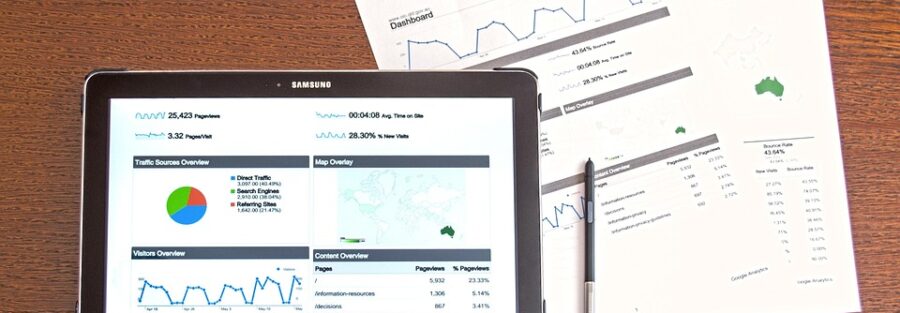
- Reporting & Analytics: Comprehensive reports and dashboards to track campaign performance and identify trends. Data is king (or queen!).
- Automation Rules: Ability to set up automated rules to trigger actions based on specific performance criteria. For instance, automatically pausing low-performing keywords or increasing bids for high-converting keywords.
- Landing Page Optimization: Tools to analyze and improve the performance of your landing pages. A great ad means nothing if the landing page is terrible.
- Integration with Other Tools: Compatibility with other marketing platforms, such as CRM and analytics software.
- User-Friendly Interface: An intuitive interface that’s easy to navigate and use. Don’t underestimate this!
- Customer Support: Responsive and helpful customer support to assist with any issues.
Popular Google Ads Management Software Options
Now, let’s get to the good stuff: some popular software choices. I’m not going to endorse a specific one as “the best,” because the ideal option depends largely on your individual needs and budget. But, here are a few solid contenders, each with its own strengths:
- Google Ads Editor: A free downloadable application from Google that allows you to manage your campaigns offline and make bulk changes. It’s powerful, but can have a bit of a learning curve for beginners. Think of it as the expert-level tool.
- Optmyzr: A popular platform known for its advanced automation features and script library. It’s a great option for agencies and experienced marketers. They offer a wide range of optimization tools, like A/B testing ad variations.
- WordStream Advisor: A user-friendly platform designed for small businesses. It provides personalized recommendations and guidance to help you optimize your campaigns. They focus on simplicity and ease of use.
- SEMrush: While primarily known as an SEO tool, SEMrush also offers comprehensive Google Ads management features, including keyword research, competitor analysis, and ad tracking. It’s a powerful all-in-one marketing platform.
- Adzooma: A platform that focuses on automating campaign management tasks and providing actionable insights. They offer a free plan with limited features.
- Marin Software: A more enterprise-level solution that offers advanced bidding algorithms and cross-channel advertising management. This one often comes with a bigger price tag.
When evaluating these options, consider factors like:
- Your Budget: Most software offers different pricing plans based on your ad spend and features.
- Your Experience Level: Some tools are more user-friendly than others.
- Your Specific Needs: What are your biggest pain points with Google Ads management? Choose a tool that addresses those challenges.
- Do they offer a trial? A test drive makes or breaks a software decision.
Beyond the Software: Best Practices for Google Ads Management
Even with the best software, success with Google Ads requires more than just automation. Here are some essential best practices to keep in mind:
- Define Clear Goals: What do you want to achieve with your campaigns? (e.g., increased website traffic, leads, sales).
- Target the Right Keywords: Use relevant and specific keywords to reach your target audience.
- Write Compelling Ad Copy: Create ads that are attention-grabbing and persuasive. Highlight benefits, not just features.
- Optimize Your Landing Pages: Ensure your landing pages are relevant to your ads and provide a seamless user experience.
- Track Your Results: Monitor your campaign performance closely and make adjustments as needed.
- A/B Test Everything: Experiment with different ad variations, landing pages, and bidding strategies to find what works best.
- Stay Updated: Google Ads is constantly evolving, so stay up-to-date on the latest best practices and features.
Let’s say you’re running a Google Ads campaign to promote a new line of running shoes. Instead of just targeting broad keywords like “running shoes,” you might target more specific keywords like “trail running shoes for women” or “marathon running shoes.” This will help you reach a more targeted audience and improve your chances of conversion.
Conclusion: Choosing the Right Path for Your Google Ads Success
Google Ads management software can be a game-changer for your online advertising efforts. By automating tasks, optimizing campaigns, and providing valuable insights, these tools can help you save time, improve ROI, and achieve your business goals. Remember to carefully evaluate your needs and budget before choosing a software solution. And most importantly, combine the power of technology with sound marketing principles and a continuous focus on optimization. Good luck!
FAQs About Google Ads Management Software
- What is Google Ads management software?
It’s a software tool designed to help businesses and marketers efficiently manage and optimize their Google Ads campaigns. It automates tasks like keyword research, bid management, ad copy optimization, and reporting.
- Is Google Ads management software worth the investment?
Yes, if you’re serious about Google Ads and want to improve your ROI, save time, and gain a competitive edge. It can be particularly beneficial for businesses with complex campaigns or limited resources.
- Can I use Google Ads management software if I’m a beginner?
Absolutely! Some platforms are designed with beginners in mind and offer user-friendly interfaces and helpful guidance. Look for options with tutorials and excellent customer support.
- Are there any free Google Ads management tools?
Yes, Google Ads Editor is a free and powerful tool from Google itself. Some platforms also offer free trials or limited free plans.
- How much does Google Ads management software cost?
Pricing varies widely, from free plans to hundreds or even thousands of dollars per month, depending on the features and ad spend. Consider your budget and choose a plan that meets your needs.
- What kind of results can I expect with Google Ads management software?
You can expect to see improvements in your click-through rates, conversion rates, cost per acquisition, and overall ROI. However, results will vary depending on your industry, target audience, and campaign setup.
- How long does it take to learn how to use Google Ads management software?
The learning curve varies depending on the complexity of the software and your prior experience with Google Ads. Some platforms are relatively easy to learn, while others require more training.
- Can Google Ads management software guarantee success?
No, no software can guarantee success. However, it can significantly increase your chances of success by providing you with the tools and insights you need to optimize your campaigns effectively. Success still depends on your overall marketing strategy and execution.
- Does Google Ads management software replace the need for a Google Ads expert?
Not necessarily. While software can automate many tasks, a Google Ads expert can still provide valuable strategic guidance and insights. It really comes down to how much managing expertise you have in house.
- How do I choose the right Google Ads management software?
Consider your budget, experience level, specific needs, and the size of your ad campaigns. Read reviews, compare features, and take advantage of free trials before making a decision.